Whether you've got stories to tell or art to create, there's a place for you here.

Scrum Masters
Drawify Integration in Project Tools
-
ARAnshu Raj- Founder & CEO, Drawify
-
Dec 19, 2025 5 min read
Let's be honest—projects today move at breakneck speed, but getting everyone on the same page? That's a different story. Your team is probably switching between project management software, docs scattered across different platforms, and endless chat threads. Yet somehow, you're all still looking at the same project through completely different lenses.
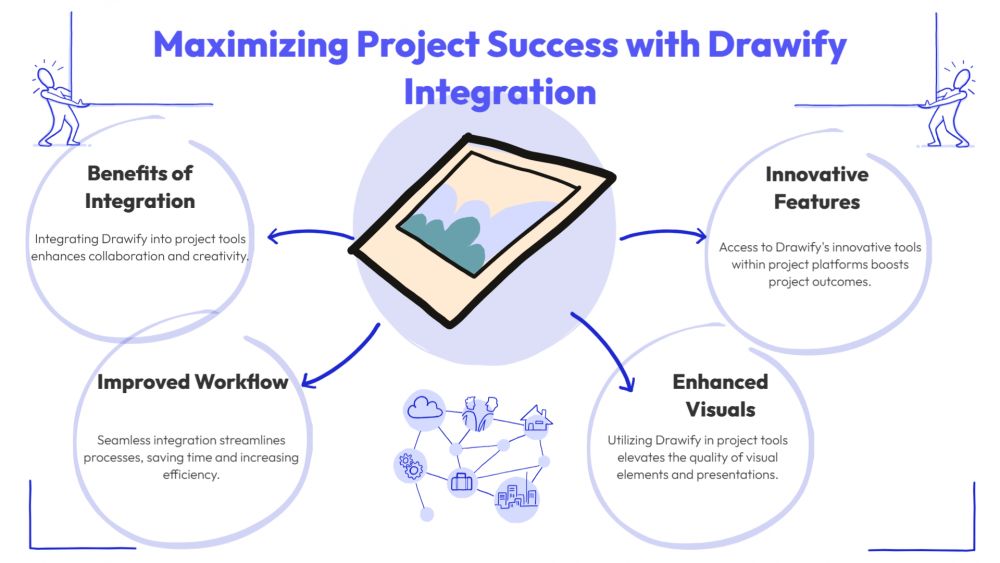
This is exactly where Drawify makes a real difference. When you integrate hand-drawn style visuals right into your existing project tools, something clicks. Suddenly, your team actually gets it—the same way, at the same time. No more "wait, I thought we meant..." moments. Just clear understanding that moves everyone from talking about the work to actually doing it.

The difference? Those friendly, sketch-style diagrams cut through the noise in a way that bullet points and dense paragraphs just can't match.
Why Visuals Actually Matter in Project Management:
Let's be honest—project management tools are great at organizing work, but they lean hard on text. You end up scrolling through long descriptions, hunting down comments, and wading through status updates that somehow make things less clear, not more.
That's where visuals come in. They help you:
- Understand complex workflows in seconds, not minutes
- Cut down on the "wait, what did you mean?" messages
- Get everyone on the same page—designers, developers, stakeholders, all of them
- Bring new team members up to speed without overwhelming them
When you build visuals directly into your project tools, clarity becomes automatic. Not something you scramble to add later.
What Does Drawify Integration Actually Do:
Think of it this way: instead of keeping your diagrams and flowcharts in separate files that people forget to check, you embed them right where the work happens—in your task boards, tickets, and planning docs.
So, your team can:
- See a diagram right in the task description
- Attach a process map to a milestone
- Pull up visuals during sprint planning or retrospectives
- Share updates with stakeholders who actually get it
Your project tools stop being just lists of tasks. They become visual workspaces.
Where Drawify Really Helps:
1. Planning Projects Visually: Swap out those text-heavy project briefs for roadmaps, timelines, and phase diagrams. Your team sees the big picture immediately—no detective work required.
2. Making Tasks Crystal Clear: Drop a visual into a task to show dependencies, execution steps, or who's handing off what. Contributors know exactly what to do, which means less confusion and faster starts.
3. Running Agile Sprints: Agile teams can map out sprint goals, user journeys, feature breakdowns, and retro insights visually. Stand-ups get more focused. Planning sessions actually move things forward.
4. Working Across Teams: When product, design, marketing, and engineering collaborate, things get lost in translation. Visuals become the common language that everyone speaks—no matter where they're based.
5. Updating Stakeholders Without the Essay: Skip the lengthy status reports. Share a progress map, a risk diagram, or a delivery timeline instead. Stakeholders get it right away, and you don't have to explain every technical detail.
What You Gain:
- Quicker Decisions: When people can see what you're talking about, approvals happen faster.
- Fewer Mistakes: Everyone's looking at the same picture. Misunderstandings drop way down.
- Better Engagement: People pay more attention to visual tasks than walls of text.
- Documentation That Actually Gets Used: Visual docs are easier to update and way easier to reference later.
- Managing Complexity: As projects grow, visuals keep things from spiraling into chaos.
How Drawify Fits In:
Drawify visuals are straightforward to create, simple to update, and flexible enough to work wherever you work. Product launch? Client project? Internal operations? Your visuals move with you.
A Few Tips:
- Focus on clarity—don't over-design
- Update diagrams when things change (because they will)
- Stick to one visual per major idea or workflow
- Keep formats consistent across teams
- Add a little text for context, but keep it short
This keeps everything clean and actually useful.
The Shift Toward Visual Work:
Teams are more spread out. Projects are more complicated. Text just doesn't cut it anymore. Integrating Drawify into your project tools closes that gap—you plan better, understand faster, and make fewer mistakes.
When visuals are part of your everyday workflow, collaboration stops being something you struggle with. It becomes one of your strengths.
Post This Article to Your Socials
Popular Topics
- Events
- Workshops
- Visual Storytelling
- How to video
- Communities
- Sketchnoting
- Templates
- UX Designers
- Agile Professionals
- Product Managers
- Freelance Graphic Designers
- Creative Tech Enthusiasts
- Online Course Creators
- Social Media Content Creator
- Creative Agency Owners
- Marketing Professionals
- EdTech Professionals
- Scrum Masters
Similar Articles
Come, Be Part of Something Special
-
Got ideas that need visual superpowers?
Jump in and start creating presentations and communications that people actually remember.
Sign In -
Are you an artist ready to grow?
Join our Drawifier family and focus on what you love most - creating art that matters.
Become a Drawifier
Get visualisation tips every week
Subscribe to the Drawify Newsletter, and feed your creativity with visualisation tips and techniques, as well as the latest Drawify workshops, news and resources.